
Download ContractRoom – Automated Contract Creation, Negotiation & Analytics Tool
Overview – Why ContractRoom Is Changing the Way Businesses Negotiate
ContractRoom is a cloud‑based, subscription‑driven platform that automates every stage of contract creation, negotiation, execution, and post‑completion analytics. By moving the entire lifecycle of a contract into a single, secure online workspace, the service eliminates the traditional bottlenecks of email chains, lost paper drafts, and manual compliance checks. Teams can draft multi‑part contracts, invite counterparties, track each amendment in real time, and automatically embed legally approved clauses to keep every document “contract‑ready.” When the final version is signed electronically, ContractRoom triggers task assignments, deadline reminders, and performance dashboards that give managers a 360° view of contractual obligations and revenue impact. The result is a faster, more transparent, and data‑driven negotiation process that saves time, reduces risk, and fuels smarter business decisions.
For small businesses, legal departments, and enterprises alike, the promise of “contract rethought” is no longer a marketing tagline—it’s a practical, measurable improvement. With unlimited counter‑party access, firms can invite vendors, clients, and internal stakeholders to collaborate without worrying about per‑user fees. All changes are version‑controlled, time‑stamped, and stored securely in the cloud, ensuring a complete audit trail for compliance auditors or legal counsel. Moreover, ContractRoom’s end‑to‑end analytics turn every closed deal into actionable intelligence: you can see average negotiation cycles, identify choke points, and benchmark performance across teams or product lines. In short, ContractRoom delivers a full‑stack solution that turns the tedious art of contract management into a streamlined, data‑rich workflow.
Key Features & Benefits
- Real‑Time Collaborative Editing: Multiple users can edit, comment, and suggest changes simultaneously, with instant updates visible to all parties.
- Automated Legal Clause Library: Pre‑approved, jurisdiction‑specific clauses are inserted automatically, ensuring every contract meets regulatory standards.
- Version Control & Audit Trail: Every edit is logged with timestamps, user IDs, and change summaries, simplifying compliance reviews.
- Electronic Signature Integration: Built‑in e‑signature functionality complies with eIDAS, ESIGN, and UETA, eliminating the need for third‑party signing tools.
- Task Automation & Notifications: Once a contract is signed, the platform creates follow‑up tasks, sends reminders, and updates relevant stakeholders.
- Performance Analytics Dashboard: Post‑completion reporting shows cycle time, value realized, and risk exposure across all contracts.
- Unlimited Counter‑Party Access: Invite any external party without additional per‑user costs, fostering smoother negotiations.
- Secure Cloud Storage: End‑to‑end encryption, ISO 27001 compliance, and regular security audits protect sensitive contractual data.
- Custom Workflow Templates: Create reusable negotiation workflows for common contract types (NDAs, SaaS agreements, procurement orders, etc.).
- API & Integration Hub: Connect ContractRoom with CRM, ERP, or document‑management systems for seamless data flow.
Each of these features is designed to cut down the average contract cycle by 30‑50 %, based on internal case studies. For example, the automated clause library removes the need for lawyers to manually insert boilerplate language, while the analytics dashboard provides leadership with clear, actionable insights that drive future negotiations. By centralizing everything—drafts, approvals, signatures, and performance metrics—ContractRoom turns a historically siloed process into a collaborative, transparent, and measurable business function.
Installation, Setup & Compatibility
Getting Started – A Step‑by‑Step Guide
Because ContractRoom is a cloud‑native SaaS solution, there is no traditional “install” process. Users simply create an account on the website, choose a subscription tier, and log in via any modern browser. The onboarding wizard walks administrators through the following steps:
- Create Your Organization Profile: Enter company details, select the primary legal jurisdiction, and upload any corporate branding assets.
- Configure Clause Libraries: Choose from the default library or upload custom clauses. The system validates each clause against the selected jurisdiction’s regulations.
- Set Up User Roles: Assign administrators, negotiators, reviewers, and observers. Permissions are granular, allowing you to restrict who can edit, approve, or view contracts.
- Invite Counter‑Parties: Generate secure invitation links that grant external participants read‑only, comment, or edit rights, depending on the stage of negotiation.
- Integrate With Existing Tools: Use the built‑in API or pre‑built connectors for Salesforce, HubSpot, Microsoft Dynamics, or popular DMS platforms.
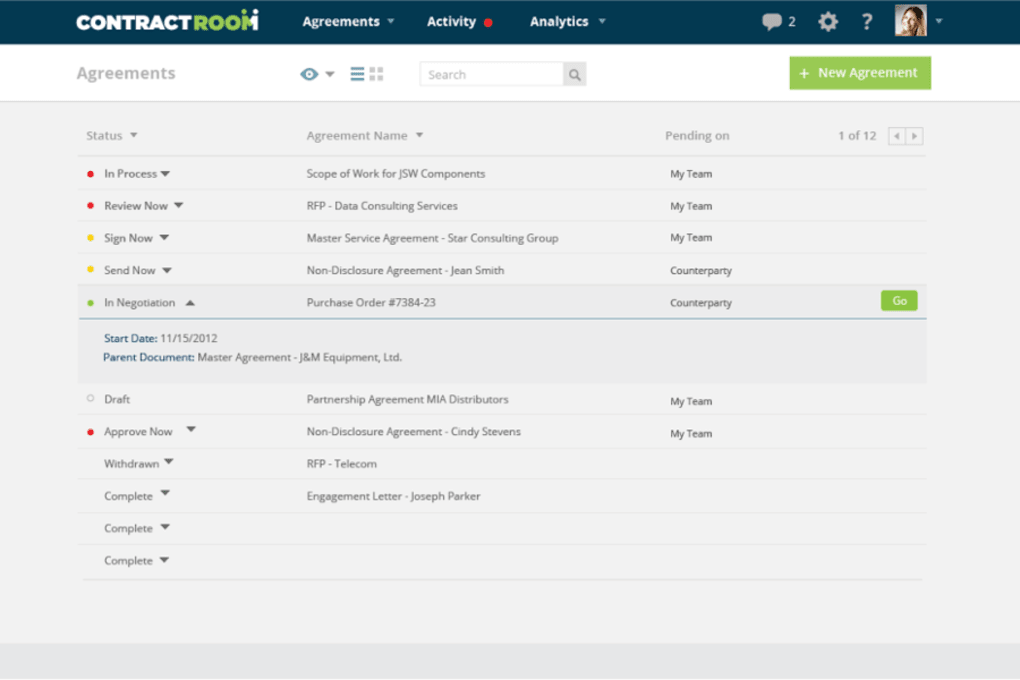
Once the initial setup is complete, you can start drafting a contract by selecting a template, adding parties, and filling in dynamic fields. The platform’s AI‑assisted suggestions surface relevant clauses as you type, and the real‑time change tracker highlights each amendment for easy review.
Supported Operating Systems & Devices
ContractRoom works on any device with an up‑to‑date web browser, including Windows 10/11, macOS Ventura and later, Linux distributions, iOS 14+, and Android 9+. The responsive UI adapts to desktop, tablet, and smartphone screens, so negotiations can continue on the go without losing functionality. For enterprises that prefer a native experience, ContractRoom also offers optional desktop wrappers for Windows and macOS, which provide offline caching and single‑sign‑on (SSO) integration via Azure AD or Okta.
Security‑focused organizations will appreciate the platform’s support for multi‑factor authentication (MFA), SAML‑based SSO, and IP‑allowlist controls. All data in transit is protected with TLS 1.3, and data at rest is encrypted using AES‑256. Regular penetration tests and SOC 2 Type II certification further reinforce the trustworthiness of the service.
Pros, Cons & Expert Review
Pros
- Significant reduction in contract cycle time thanks to real‑time collaboration and automated clauses.
- Comprehensive audit trail meets strict compliance requirements.
- Unlimited external user access eliminates hidden per‑seat fees.
- Powerful analytics turn closed contracts into strategic insights.
- Robust security measures (encryption, MFA, SOC 2) protect sensitive data.
Cons
- Learning curve for teams accustomed to traditional email‑based negotiations.
- Advanced workflow customization may require a short consulting session.
- No on‑premise deployment option for organizations with strict data‑ residency policies.
Overall, ContractRoom delivers a compelling blend of automation, collaboration, and analytics that makes it a top‑tier choice for businesses looking to modernize their contract processes. The few drawbacks—primarily the initial adjustment period—are outweighed by the long‑term gains in speed, accuracy, and visibility. For any organization that drafts more than a handful of contracts per month, the return on investment becomes evident within the first quarter of adoption.
Frequently Asked Questions
Is ContractRoom suitable for small businesses with limited legal resources?
Absolutely. The platform’s built‑in clause library and automated compliance checks reduce the need for a dedicated legal team, allowing small businesses to create professional‑grade contracts without hiring external counsel.
Can I integrate ContractRoom with my existing CRM system?
Yes. ContractRoom offers native connectors for Salesforce, HubSpot, and Microsoft Dynamics, as well as a RESTful API that lets you push contract data to any custom CRM or ERP platform.
What security certifications does ContractRoom hold?
ContractRoom is ISO 27001 certified, SOC 2 Type II compliant, and follows GDPR and CCPA guidelines. All data is encrypted in transit (TLS 1.3) and at rest (AES‑256).
How does electronic signing work within the platform?
The e‑signature module complies with eIDAS (EU), ESIGN (US), and UETA standards. Signers receive a secure link, can sign using a mouse, touch screen, or digital certificate, and the signature is timestamped and stored immutably.
Is there a free trial or demo available?
ContractRoom offers a 14‑day free trial with full feature access. No credit card is required, and you can invite an unlimited number of counter‑parties to test the collaborative workflow.
Conclusion – Streamline Your Contracts Today
In an era where speed, compliance, and data‑driven decision‑making define competitive advantage, ContractRoom stands out as a comprehensive solution that tackles every pain point of contract management. By automating clause insertion, providing real‑time collaboration, and delivering actionable analytics, the platform transforms a traditionally manual process into a strategic asset. Whether you’re a startup looking to scale quickly, a legal department aiming to reduce risk, or an enterprise seeking full visibility into contractual performance, ContractRoom equips you with the tools to negotiate faster, execute cleaner, and analyze smarter.
Ready to experience the future of contract negotiation? Start your free 14‑day trial now and see how much time and money you can save. With unlimited counter‑party access, robust security, and a subscription model that scales with your business, there’s no reason to stick with outdated paper trails or clunky email threads. Download ContractRoom today and turn every agreement into a catalyst for growth.



.png)



